Modern laptops keep shipping with fewer ports than the ones they replaced — often just USB-C, full stop — which means the HDMI cable, SD card, and USB flash drive you used to plug in directly now all need an adapter first. The real spec to check isn't the port count in the name, it's the power-delivery wattage passed through to your laptop while everything else is connected. Four real, currently-listed picks below.
The spec that actually matters: pass-through power
"7-in-1" is a marketing number. Watts are the real spec.
Every hub in this category advertises a port count in its name — "5-in-1," "7-in-1" — but that number is really just a tally of every plug on the case, and it tells you almost nothing about performance. The spec worth actually comparing is the Power Delivery (PD) wattage the hub passes through to charge your laptop while everything else stays plugged in. A hub rated for 100W PD pass-through can keep a power-hungry laptop charging at full speed even while running an external display and a card reader; a lower-wattage hub might trickle-charge or not charge at all under the same load, quietly draining your battery during a long work session.
The second real distinction is HDMI resolution and refresh rate — "4K" alone doesn't specify whether that's 4K at 30Hz (adequate for a static monitor, noticeably laggy for video or fast scrolling) or 4K at 60Hz (smooth, the number worth actually looking for). Cheaper hubs sometimes advertise "4K support" while quietly capping at 30Hz, which only shows up once you've already plugged it in.
Ethernet ports are the other feature worth flagging if you need one: only some hubs include a wired network jack, and it's an easy one to miss in a spec list dominated by USB and HDMI icons.
Quick facts
100W PD pass-through
The single biggest predictor of whether your laptop actually charges normally while the hub is doing everything else — worth prioritizing over an extra USB-A port or two.
4K at 60Hz, specifically
Don't take "4K" at face value — look for "60Hz" stated explicitly next to it, or assume the lower, laggier refresh rate.
A wired Ethernet port
Genuinely useful for video calls on unreliable WiFi, but only some hubs in this category include it — worth a specific check if it matters to you.
4 real picks, all with real PD wattage listed
Every photo below is pulled directly from each product's real, live Amazon listing.
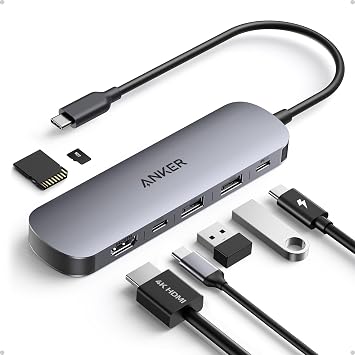
Anker 7-in-1 USB-C Hub
85W PD pass-through, HDMI output, two USB 3.0 ports, and an SD/TF card reader in one compact unit — a well-rounded, brand-trusted default for most laptop setups.
Shop it on Amazon →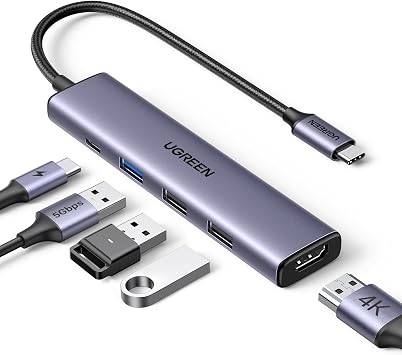
UGREEN Revodok 105, 5-in-1
Fewer ports than the others on this list, but a full 100W PD pass-through and 4K HDMI in a smaller footprint — the pick if you want minimal bulk and don't need extra USB-A ports.
Shop it on Amazon →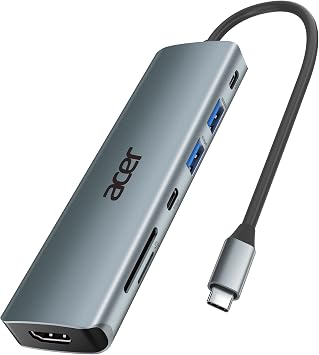
Acer 7-in-1 USB-C Hub
Full 100W PD pass-through with a 4K HDMI output and an SD card reader — a strong spec sheet from a brand better known for laptops than accessories.
Shop it on Amazon →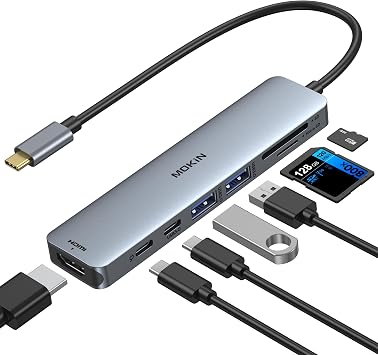
MOKiN 7-in-1 USB-C Hub
Also 100W PD pass-through with an SD/TF card reader built in — a budget-friendlier alternative to the bigger brand names above, with a comparable core spec sheet.
Shop it on Amazon →Common questions
What's the difference between a "hub" and a "dock"?
Mostly scale and desk permanence. A hub (what's covered here) is a small, portable adapter you carry with your laptop. A dock is typically larger, often sits permanently on a desk, and can drive multiple external monitors plus a full array of peripherals — usually the better choice for a fixed desk setup rather than travel.
Will any USB-C hub charge my laptop at full speed?
Only if its PD pass-through wattage meets or exceeds your laptop's charging requirement — check your laptop's original charger's wattage and compare it against the hub's stated PD spec before assuming full-speed charging.
Does "4K support" always mean 4K at 60Hz?
No — some budget hubs cap out at 4K/30Hz while still advertising "4K support" without specifying the refresh rate. Look for "60Hz" stated explicitly if smooth video or fast scrolling on the external display matters to you.
Do I need Ethernet on a USB-C hub?
Only if WiFi reliability is a real problem for you — for video calls or large file transfers on shaky WiFi, a wired connection through the hub's Ethernet port (where included) is noticeably more stable than wireless.
Disclosure. Product names, brands, and photos are pulled directly from each item's real, live Amazon listing at the time of publishing — inventory and availability can change. DopamineKart did not receive free products or payment from any brand featured here. Corrections: email us.